Integration Briefing · For the design team

Inside Neptune Flood's agent portal — and what we should steal for Fusion

On July 8 we met with Neptune Flood's CEO Trevor Burgess and engineering lead Jean-Luc Eckstein for a walkthrough of their agent quoting experience, ahead of our API integration. This is the tour for everyone who wasn't in the room: cleaned-up screens, what makes the workflow good, and where it plugs into Brightway.

Meeting: Neptune Integration Launch · July 8, 2026  ·  Brightway: Nick Clements, Dan Lewis, Ben Marks, Charles Baumberger, Jonas Edgeworth, Anna Abovyan  ·  Neptune: Trevor Burgess (CEO), Jean-Luc Eckstein

How Neptune works today — start here

Neptune is a private flood carrier with an agent-facing quoting portal (their AI copilot, Atlas+, runs alongside it). There is one way to build a quote and three ways it can end. Everything on this page exists in production today — the screenshots further down are just this same flow, step by step.

1 · Agent enters the property address 2 · Rate Call 1 — an instant, bindable quote Priced at NFIP defaults. Extra info can only refine it — never disqualify. 3 · Agent refines the property details Quote reprices live — with more data, the price usually drops (~90%). PATH A · Bind on the spot Customer says yes on the call. The agent clicks Bind — the policy is active immediately. PATH B · Send to the customer The agent emails the quote. The customer opens a personal link, adjusts coverage, watches the premium update, and binds it themselves — the agent keeps full credit + commission. PATH C · Customer declines The customer declines. The agent sends a Flood Rejection email; the customer signs it → an E&O record is created. The same email carries a second-chance buy link — about 20% bind anyway.
One quote build (top) → three possible endings (bottom). Paths B and C both hand the customer a self-serve link while the agent keeps the credit.

The quote: two speeds

  • Rate Call 1 — fires the moment an address is entered. Returns a real, bindable price with no further input.
  • Refined quote — as the agent fills in property details, the same quote reprices. Neptune leans on Rate Call 1 because more data can only lower the price, not disqualify the risk.

What it defaults to

  • Building coverage defaults to the NFIP limit ($250,000) when only an address is known; one API call can return both NFIP and full replacement-cost pricing.
  • A mid-tier deductible ($5,000 in the demo) is preselected; every tier is one click away.
  • Quotes stay valid 60 days and each carries a deep link back into Neptune.

Hard stops (kickouts)

  • More than one prior flood loss, or any single loss over $25,000.
  • Manufactured / mobile homes.
  • Buildings partially or entirely over water.
  • These block a quote up front. Everything else only adjusts the price — it never voids eligibility.

Why this matters right now

Hurricane season selling peaks August–October. July is the runway. The shared goal from the meeting: go live soon with something awesome — phases 2–3 can be enhancements over time.

Address → quote
"Rate Call 1" returns a bindable price from an address alone. More data never makes it ineligible — in ~90% of cases the price only goes down.
60 days
Quote validity — long enough to tag a flood quote onto every homeowner quote we generate.
~20%
Of customers who receive the flood declination email end up clicking through and buying anyway.
25–30k/day
Quote volume Neptune's API handles today — batch campaigns are realistic.
NFIP + RCV
One call can return both NFIP-limit ($250k default) and full-replacement-value pricing side by side.
Deep links
Every quote number doubles as a deep link into Neptune's portal — and an optional direct-to-consumer link comes back as an API parameter.

The workflow, screen by screen

Trevor quoted a real Saint Petersburg property live, from address to bound-ready policy, in a couple of minutes. Faces and meeting chrome cropped out; these are the shared screens only.
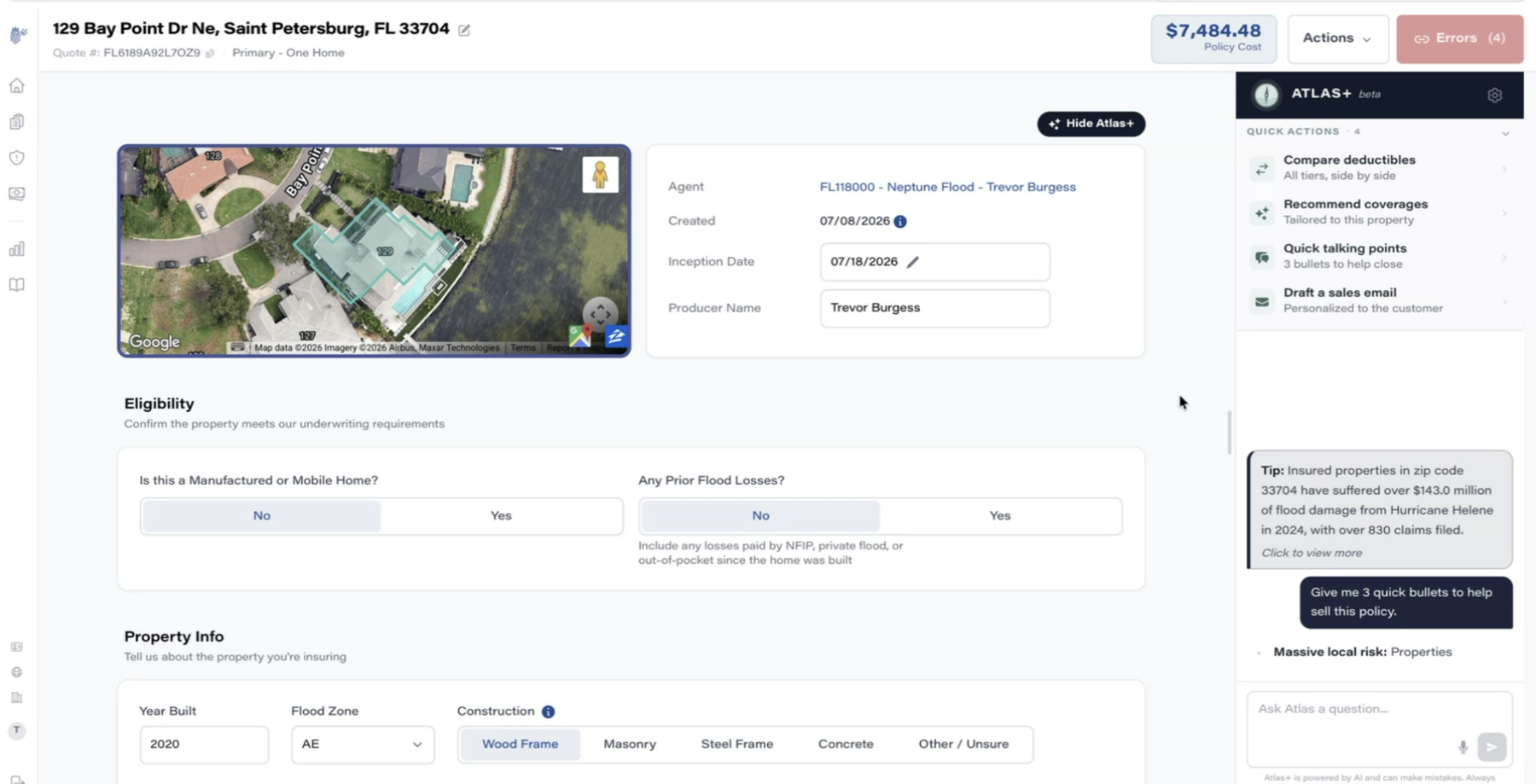
Neptune quote overview screen
Screen 1
One screen, price always on

Address, aerial map with the parcel outlined, agent attribution, and the live policy cost pinned to the header. Note the error model: instead of blocking, a red Errors (4) counter sits where Bind will eventually be. Atlas+ (their AI copilot) opens with proactive local context: properties in zip 33704 took $143M in flood damage from Hurricane Helene, 830+ claims.
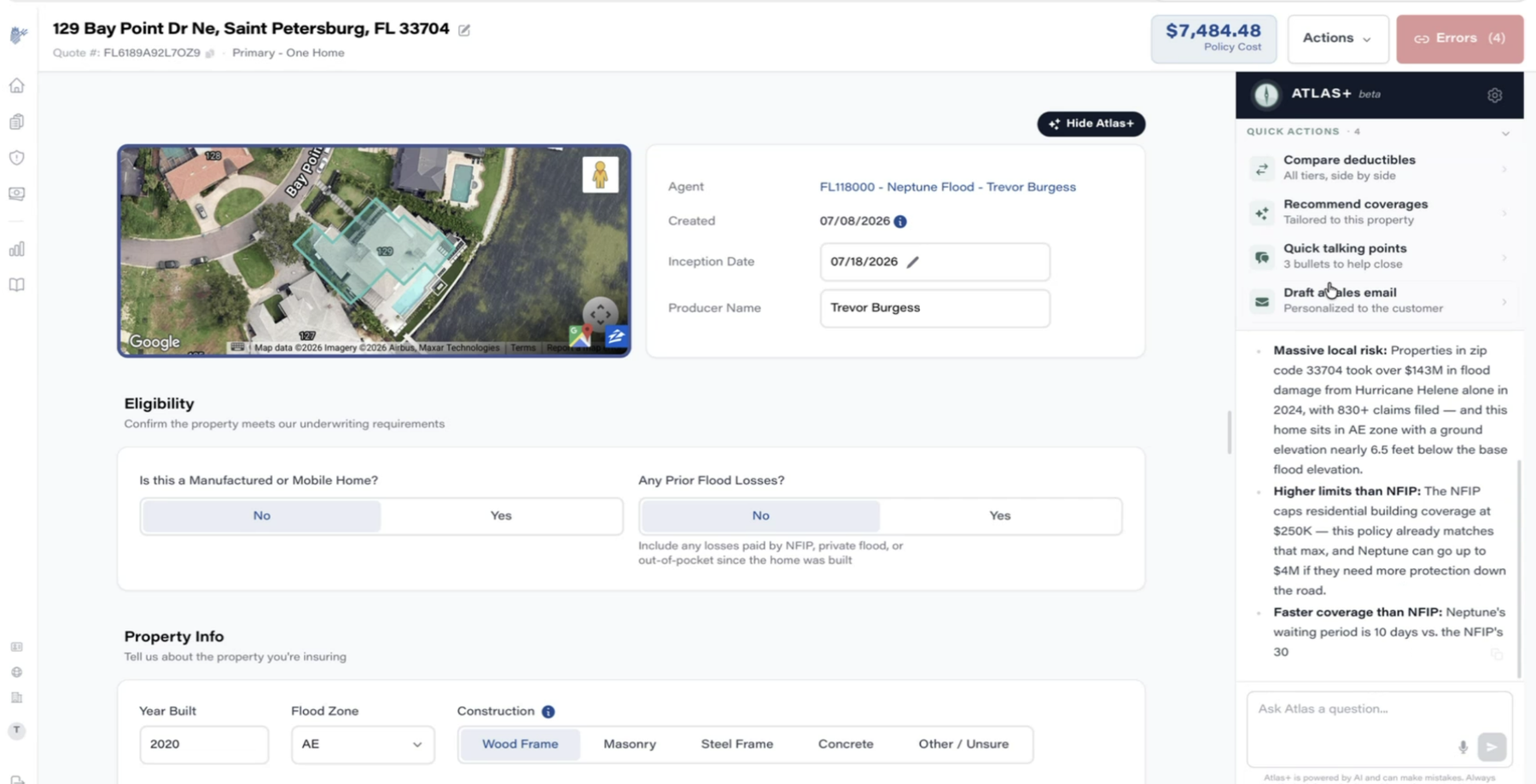
Atlas+ talking points
Screen 2
Atlas+ generates sell-side talking points

"Give me 3 quick bullets to help sell this policy" → massive local risk, higher limits than NFIP ($250k cap vs Neptune's $4M), 10-day vs 30-day waiting period. Trevor's framing: this "helps the agent feel smart talking about flood" and drives close rates. Quick actions include compare deductibles, recommend coverages, and draft a personalized sales email.
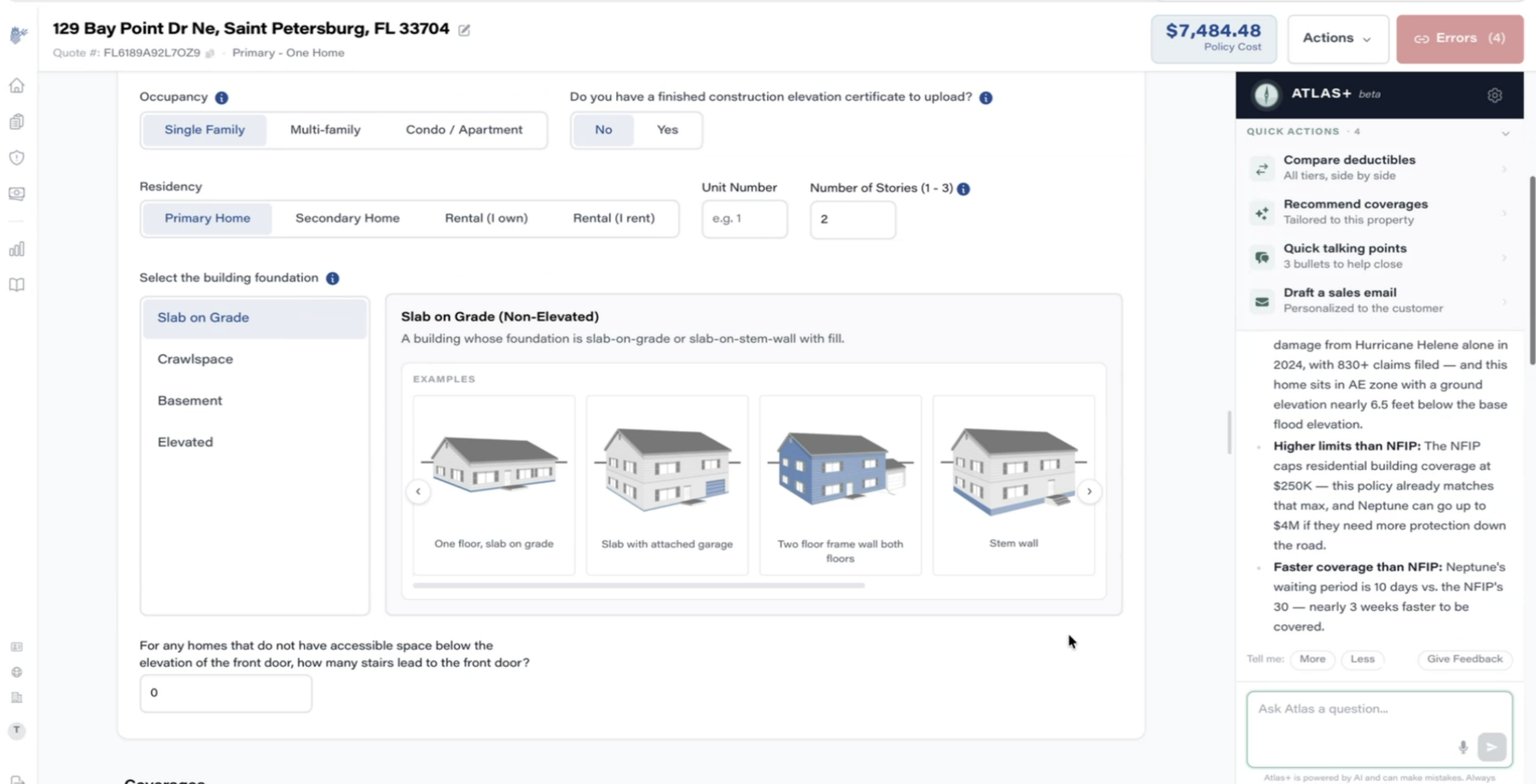
Property form with illustrated foundation picker
Screen 3
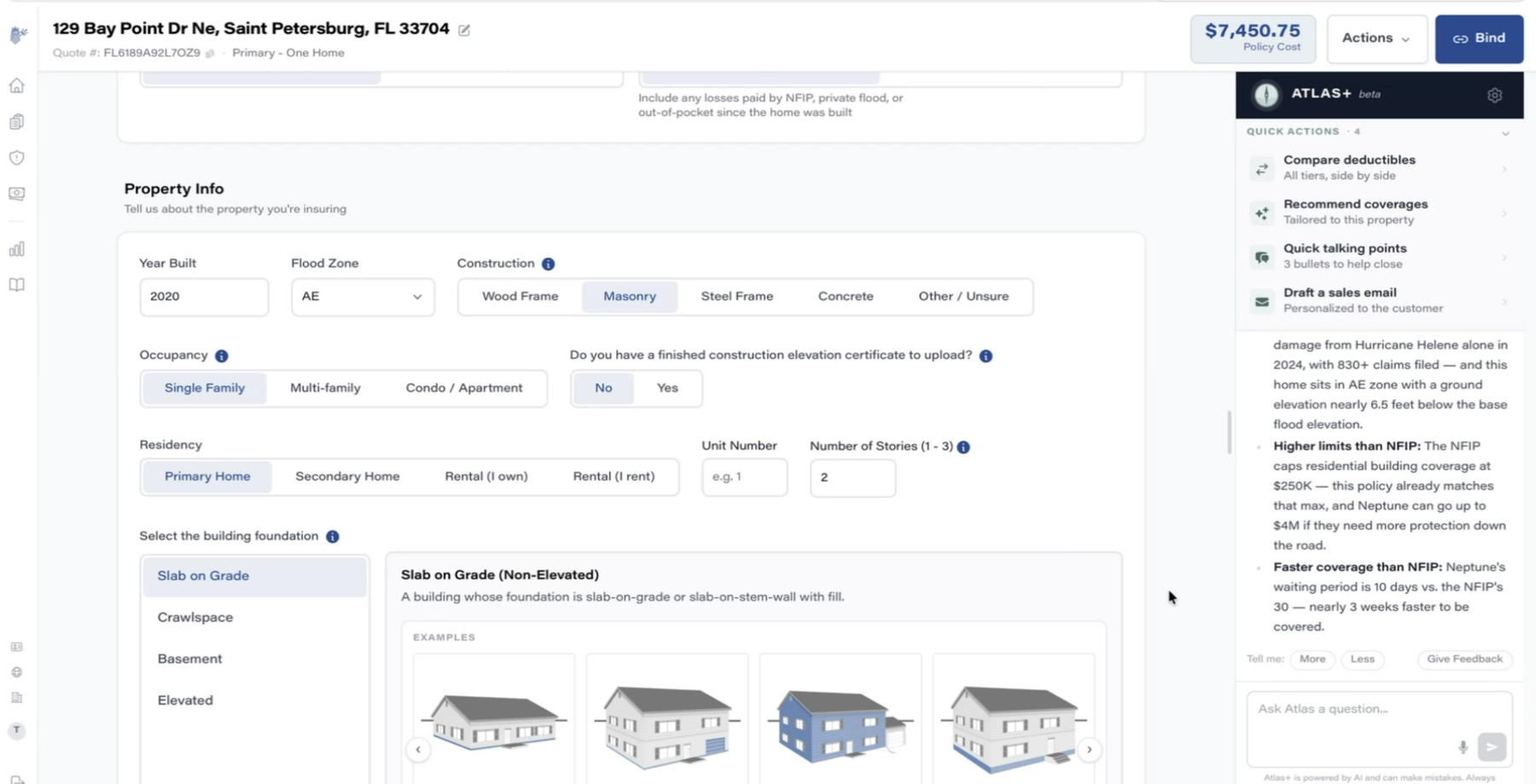
Forms a non-expert can answer

The foundation question — where customers usually stumble — is answered with an illustrated picker (slab, crawlspace, basement, elevated, each with example drawings). Everything defaults sensibly; the agent only refines.
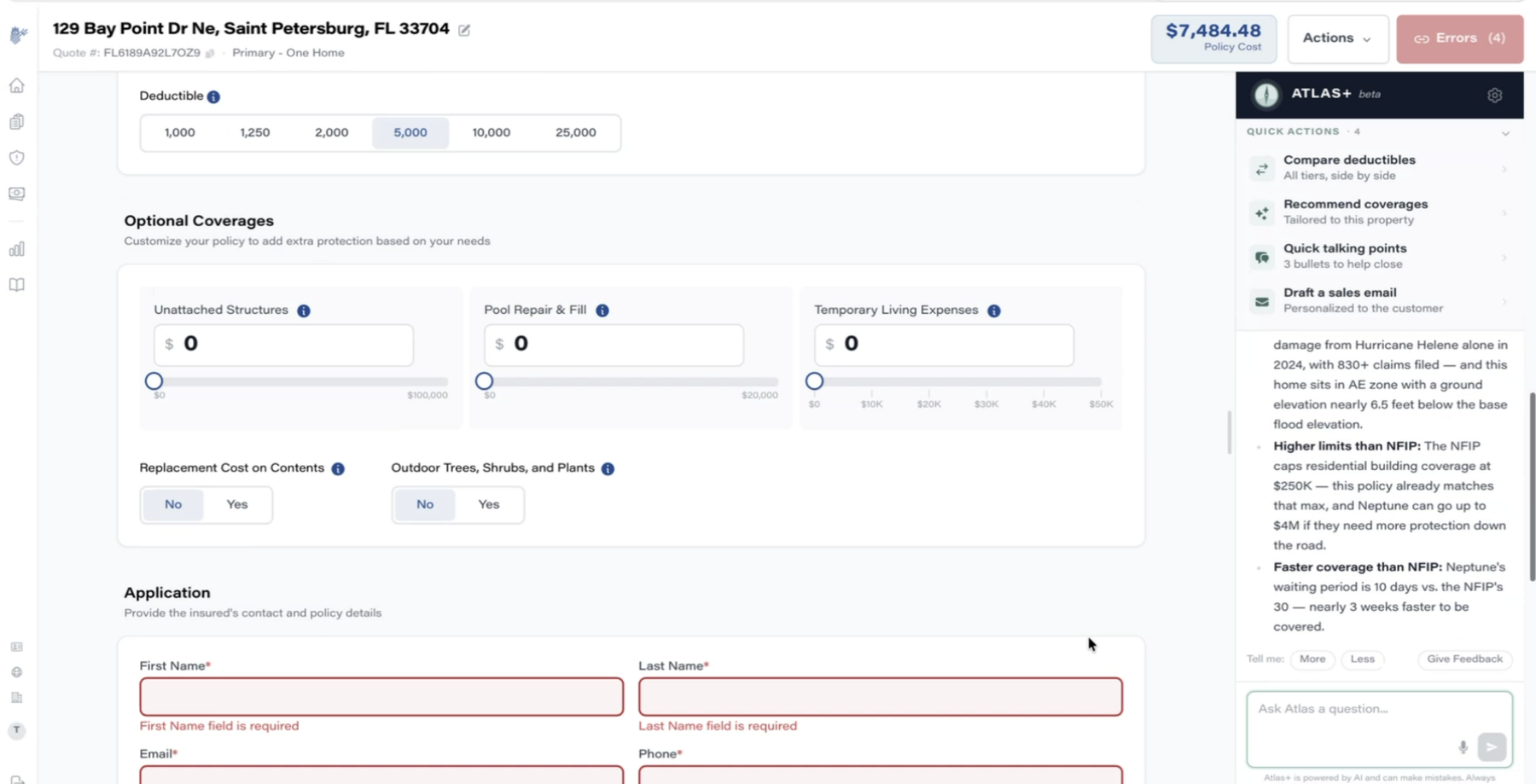
Application with inline validation
Screen 4
Validation that never blocks

Required fields show inline errors, and the header counter ticks down as they're resolved — Errors (4) → (2) → Bind. The quote and price exist the whole time; completeness only gates the final action, not the exploration.
Live repricing on construction change
Screen 5
Every edit reprices instantly

Switching construction Wood Frame → Masonry updates the header price in place ($7,484 → $7,451). No "recalculate" button, no page reload — the Google Flights lever model we keep referencing.
Atlas+ deductible comparison table
Screen 6
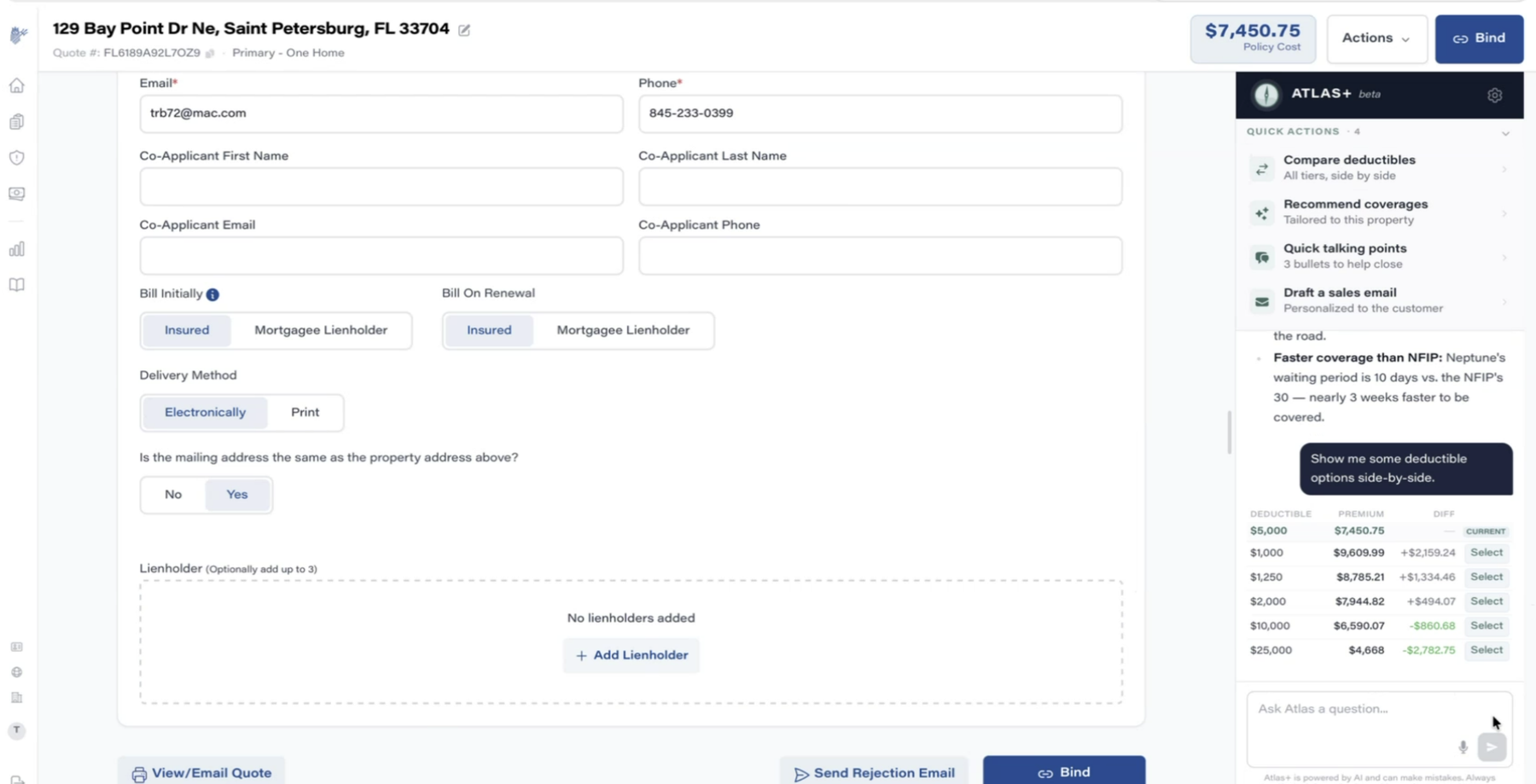
Deductible trade-offs as a table, on demand

"Show me some deductible options side-by-side" → a compact table of every tier with premium and delta ($1k = +$2,159 … $25k = −$2,783), each with a one-click Select. This is the most common live-call negotiation (customer asks "what if the deductible were higher?"), served in seconds.
Atlas+ narrative recommendation
Screen 7
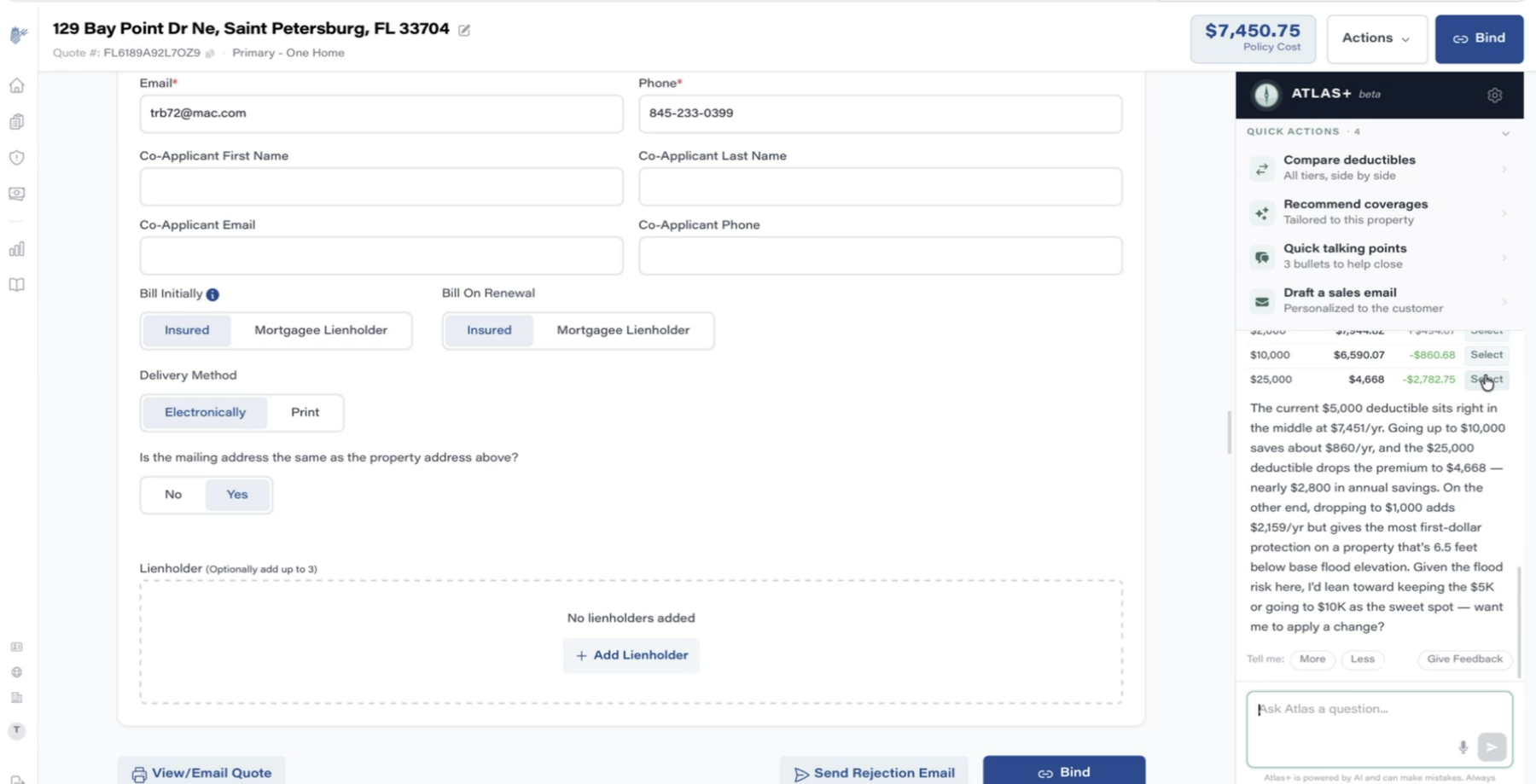
…then an actual recommendation

Atlas doesn't stop at the table — it narrates the trade-off (the property sits 6.5 ft below base flood elevation, so first-dollar protection matters) and lands on a stance: keep $5k or go $10k. Then: "want me to apply a change?"
Atlas applies the deductible change
Screen 8
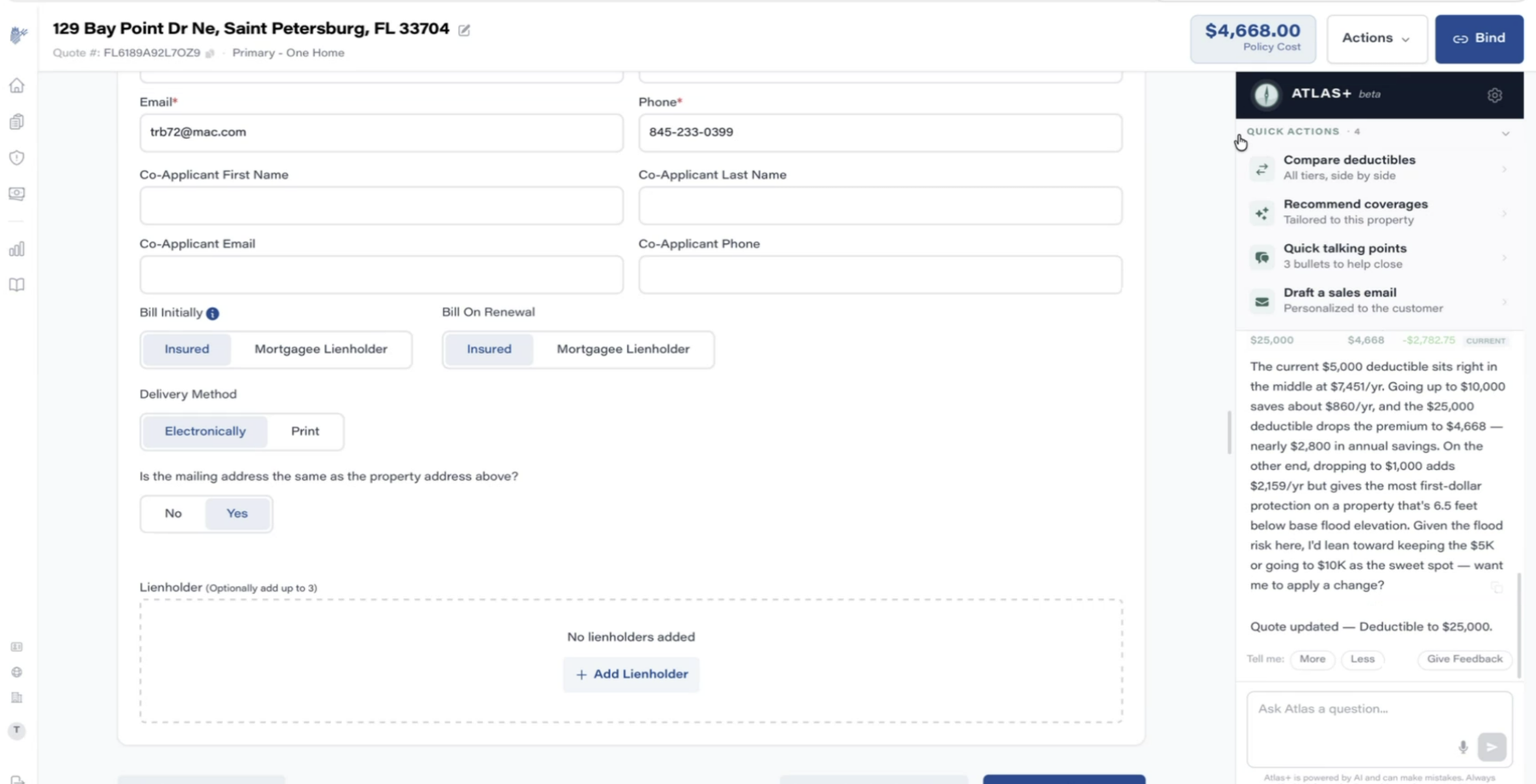
The copilot acts, not just advises

The agent says yes, and Atlas edits the quote itself — "Quote updated — Deductible to $25,000", header reprices to $4,668. This is the agentic step beyond our current Ray patterns: conversational panel + the ability to safely mutate the working quote.
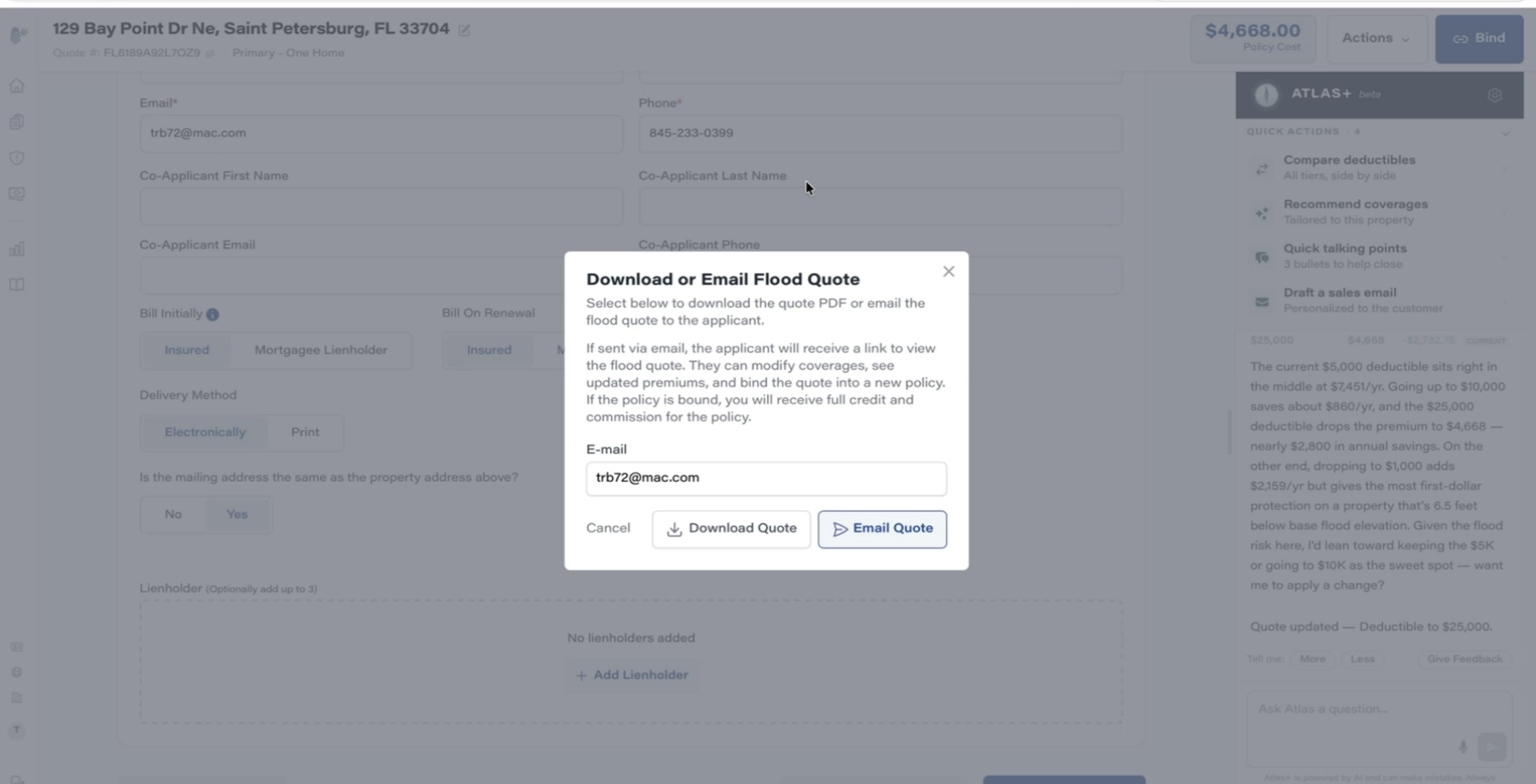
Download or email flood quote modal
Screen 9
Quote delivery keeps the agent in the loop

Email the quote and the customer gets a link where they can adjust coverages, watch the premium update, and bind on their own — with the originating agent keeping full credit and commission. Self-service that doesn't disintermediate the agent.
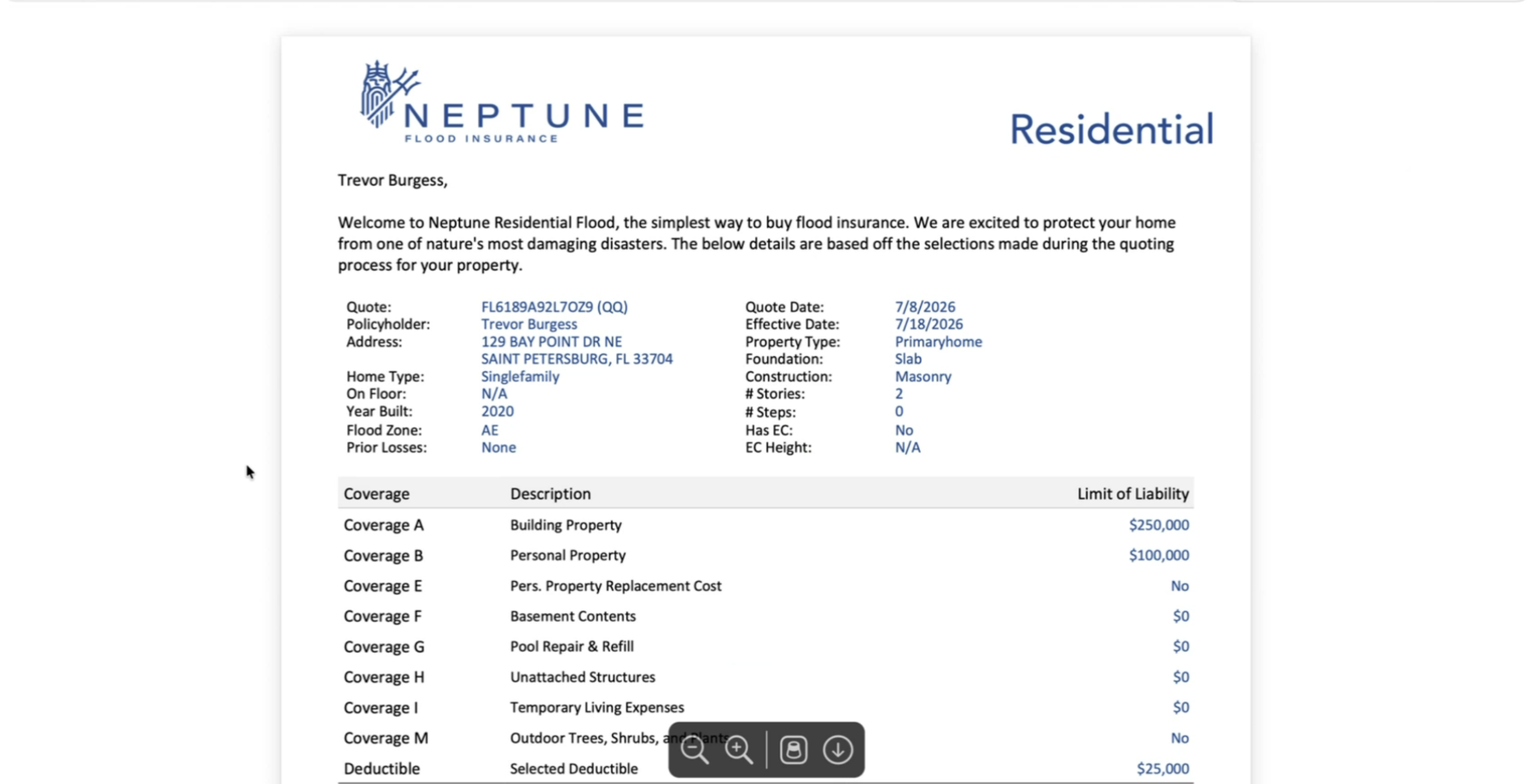
Neptune quote PDF
Screen 10
The quote document

Clean one-pager: property characteristics, coverage schedule A–M, selected deductible, and total annual cost. Familiar shape for anyone who's read a dec page — easy for advisors to walk a customer through.
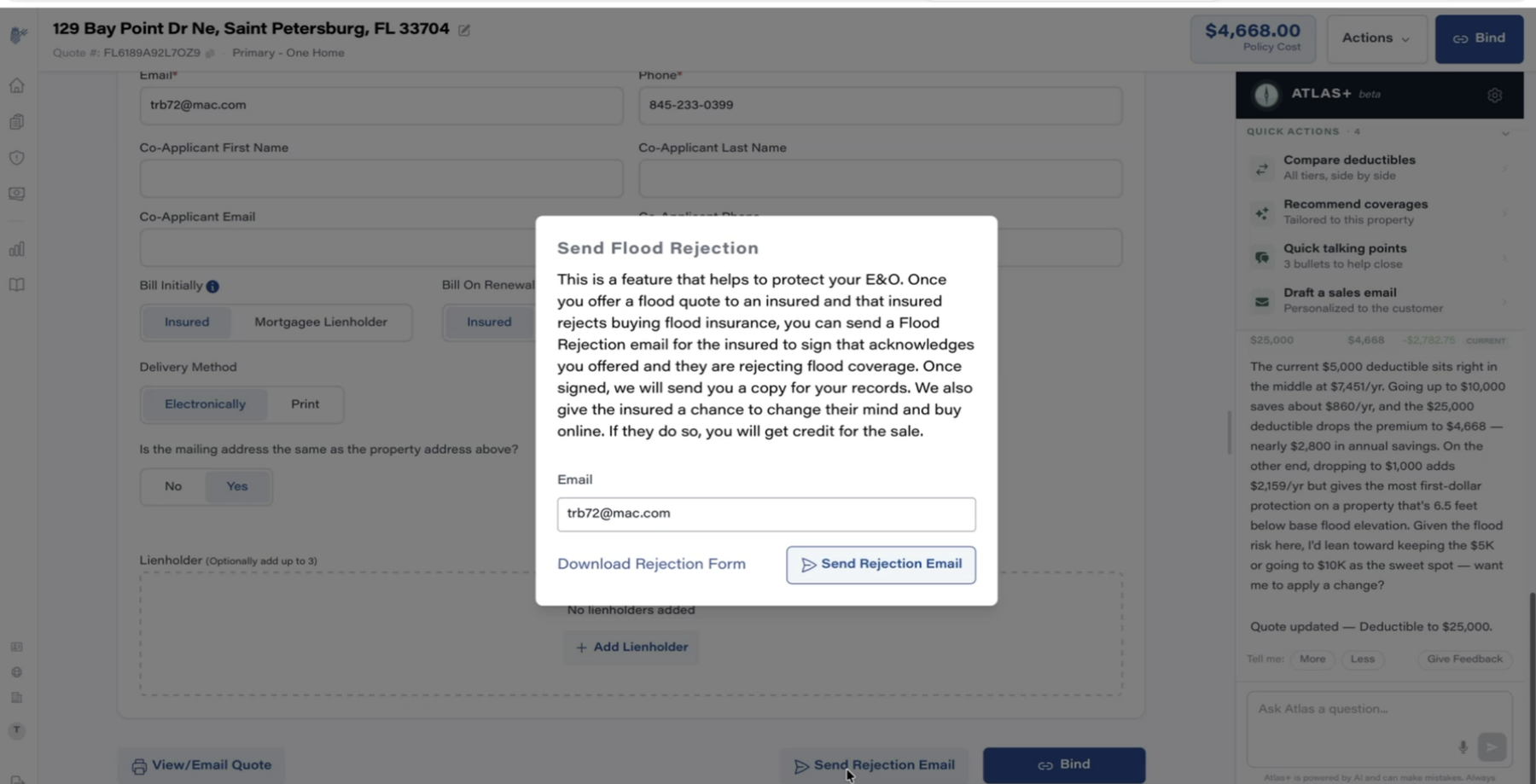
Send flood rejection modal
Screen 11
The declination flow — the meeting's cornerstone

If the customer declines flood, the agent sends a Flood Rejection email: the insured signs an acknowledgment that coverage was offered and refused — E&O protection with an automatic audit trail. And the email gives them one more chance to change their mind and buy online (~20% do). Also available as a raw form via API if we'd rather run it through our own comms.
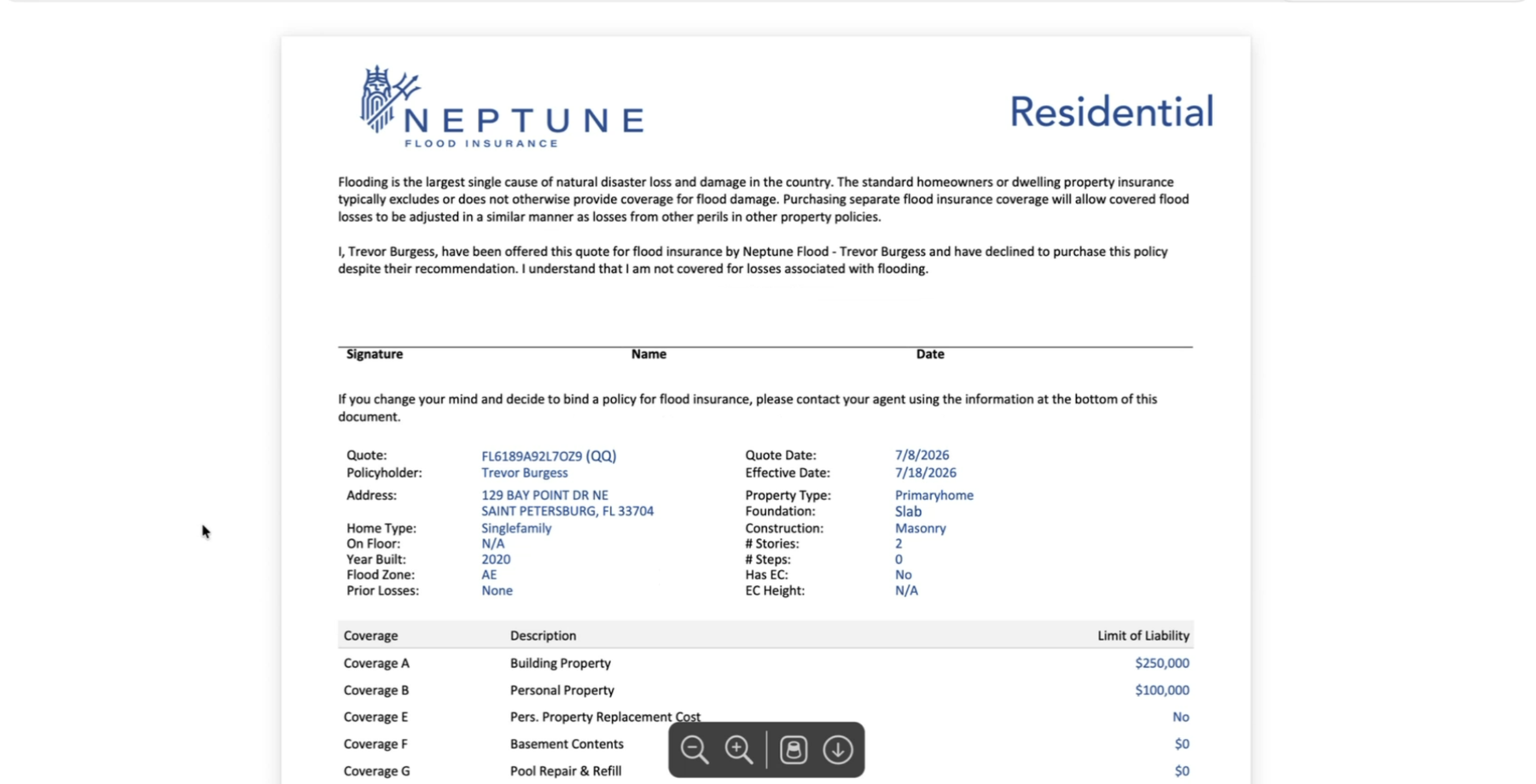
Flood declination form
Screen 12
The signed declination document

"I have been offered this quote … and have declined to purchase this policy. I understand I am not covered for losses associated with flooding." Signature, name, date — plus the full quote details below so the declined offer is unambiguous and recoverable.

Where this plugs into Brightway

Opportunities called out in the meeting, mapped to our surfaces.

Quote alongside every home quote

Early quote return ("Rate Call 1") means a flood price can appear next to homeowner quotes at address-entry time in Fusion — bundling for attachment rate, refined automatically as home data fills in.

EC Renewal Screen

When a renewal case loads for a customer without flood coverage, surface a live Neptune quote as a retention/cross-sell lever — fits the existing Ray ambient-intelligence pattern.

myBrightway self-service

Return the direct-to-consumer link via API and put it in the customer portal — especially during hurricane season when customers log in scared and motivated.

Declination as a Brightway flow

Mirror the rejection email inside our own comms (form available via API), so every declined flood offer produces an E&O-grade record — and a second-chance sale.

Campaigns with real quotes

25–30k quotes/day + Atlas-style local risk stats ("rates in this zip…") enable zip-code marketing and quote-not-closed follow-ups with actual prices, not generic pitches.

Ray, one step further

Atlas+ validates our two Ray modes — and adds a third worth designing: copilot actions that modify the working quote ("want me to apply a change?"). Also feeds Rob's sales-scripting tool with talking points.